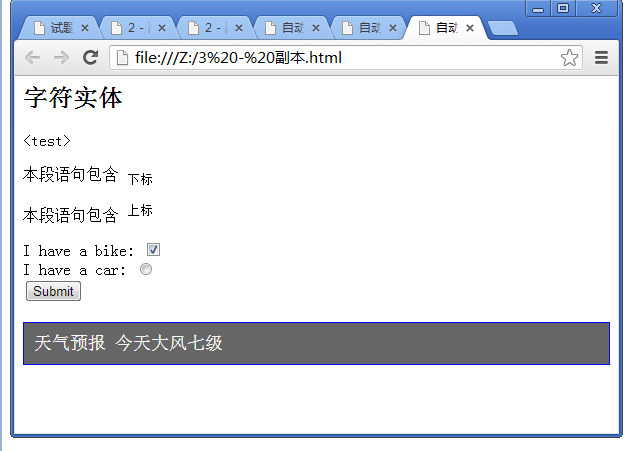
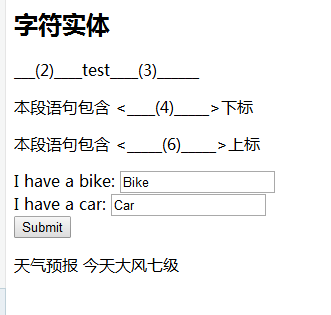
简答题 Web程序设计
题号 #5101620

<!DOCTYPE html PUBLIC "-//W3C//DTD XHTML 1.0 Transitional//EN"
"http://www.w3.org/TR/xhtml1/DTD/xhtml1-transitional.dtd">

<html xmlns="http://www.w3.org/1999/xhtml">

<head>
<meta http-equiv="content-type" content="text/html;charset=utf-8" />
<title>未标题页面</title>
</head>

        <!-- **********Found********** -->
<body ______________="begintimer()">
<script language="JavaScript">
var limit="1:59"
var parselimit=limit.split(":");
// **********Found**********
parselimit=______________*60+______________*1;
function begintimer(){
if (parselimit==1)
//下面是限制时间到了后去的连接页面,自己修改。
window.location="1.htm"
else{ 
parselimit-=1
// **********Found**********
curmin=Math._______________;
cursec=parselimit-curmin*60;
if (curmin!=0)
curtime="你剩下"+curmin+"分"+cursec+"秒的时间。"
else
curtime="你剩下"+cursec+"秒的时间。"
//下一句需要设置定时器
// **********Found**********
________________;
//下一句告诉访问者剩余的时间,在文本框中显示。
document.lefttime.left.value=curtime;
//下一句告诉访问者剩余的时间,在状态栏中显示。
// **********Found**********
window.___________=curtime;
}
}
</script>

<p>
<form name="lefttime">
<input type="text" name="left">
</form>
</p>
</body>

</html>
本题的功能是:当访问该页面到指定时间长度(1分59秒)时,自动跳转到新的网页,并每隔1秒在文本框和状态栏中显示剩余时间。

进入在线模考

参考答案

暂无

答案解析

答案:(1)onload;(2)parselimit[0];(3)parselimit[1];(4)floor(parselimit/60);(5)setTimeout("begintimer()",1000);(6)status。 解析:本题实现当访问该页面到指定时间长度(1分59秒)时,自动跳转到新的网页,并每隔1秒在文本框和状态栏中显示剩余时间,因此在body中加入onload事件来调用begintimer()函数,故(1)处填写onload,由于split返回的是一个数组,因此parselimit获取的就是秒数,因此按照事件格式,将其换算成秒数,故(2)填parselimit[O],(3)填parselimit[1]。parselimit[O]是分钟所表示的值,parselimit[1]是秒所表示的值,在begintimer()函数中curmin是通过Math方法里的取整数获得值,其中,curmin获取的是分钟的值,因此需要取整故(4)处填floor(parselimit/60),而(5)处是设定计时器,每秒执行begintimer()函数,故(5)处填setTimeout("begintimer()",1000),setTimeout是设定计时器的函数。
你可能感兴趣的试题

1 1.<html>
<body>
<title> 图像用于超级链接</title>
<p>
欢迎进入宠物世界:
<!-- ********FOUND********* -->
<a ______=" www.petsWorld.com/turtles.htm ">
<!-- ********FOUND********* -->
<img ______="turtle.jpg" width="800" height="600"  
/* ********FOUND********* */
________ = 欢迎点击图片进入一个新的世界 
/* ********FOUND********* */
______ = 可爱的小乌龟></a>
</p>
</body>
</html>
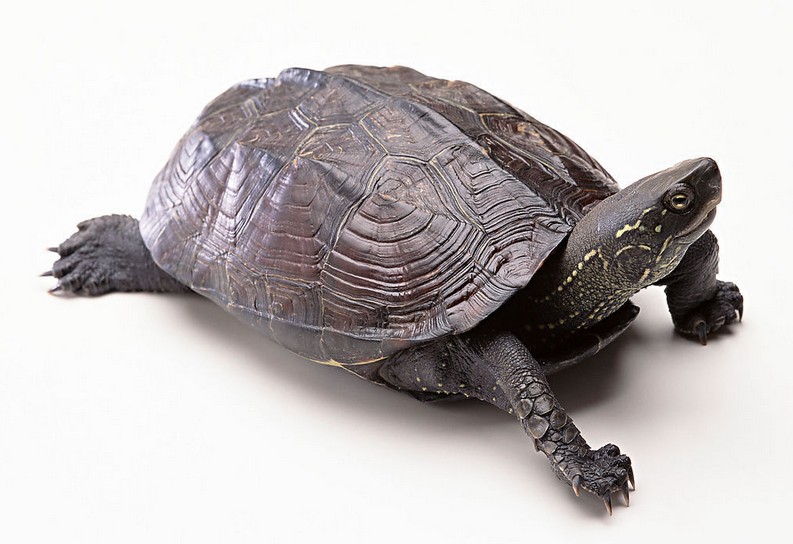
本题的要求是:在一个Web页面中展示一张图片,当用鼠标点击该图片时,会链接到一个新的网站www.petsWorld.com/turtles.htm,限制图片显示大小为800*600当鼠标悬停在图片上时,显示:“欢迎点击图片进入一个新的世界”;如果图像无法显示,则网页需要显示“可爱的小鸟龟”。

2.<html>
<head>
<!-- **********Found********** -->
<style _______="text/css">
p.small {line-height: 80%;
/* **********Found********** */
_________: 25pt}
#big {line-height: 200%;
/* **********Found********** */
__________: right;
letter-spacing: 20px }
</style>
</head>
<body>
<!-- **********Found********** -->
<p _______="small">
这个段落拥有更小的行高。<br>
这个段落拥有更小的行高。<br>
</p>
<!-- **********Found********** -->
<p _________="big">
这个段落拥有更大的行高。<br>
这个段落拥有更大的行高。<br>
</p>
</body>
</html> 
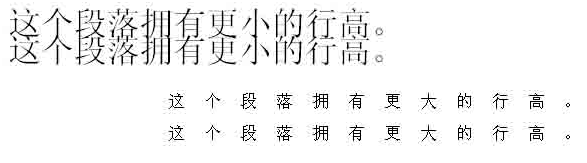
本题的要求是:将前两行文字以25pt的大小,行间距为正常的08倍左对齐显示;后两行文字行间距放大2倍,字间距为20px右对齐显示。效果如图所示。

2 1.<html>
<head>
<script type="text/javascript" >
function closeWin(){
//在此处添加代码
// **********Found**********
if(________________("确定要退出吗?")){
// **********Found**********
________________;
}
}
function morning(){
now = new Date();
// **********Found**********
hour = _______________; 
if (hour < 9){window.status="早上好!"}
else {window.status="下午好!";}}
</script>
</head>
<!-- **********Found********** -->
<body ________________="morning()">
<!-- **********Found********** -->
<input type="button" value="关闭窗口" onclick="______________"/>
</body>
</html>
本题的功能是:在早上9点前则在窗囗状态栏中显示“早上好”,否则显示“下午好”。点击页面中的按钮时,弹出对话框提示“确定要退出吗”,确定后自动关闭窗口。
2.<html>
<head>
<script>
function foo()
{
var str = reverse('a,b,c,d,e,f,g');
alert(str);
if (str == 'g,f,e,d,c,b,a')
alert('成功');
else alert('失败');
}
function reverse(str)
{
// 在此处加入代码,完成字符串翻转功能
// **********Found**********
var spl = str._____________(',');
var newstr="";
// **********Found**********
for(i=____________;i>=0;i--)
{
// **********Found**********
newstr+=____________+',';
}
// **********Found**********
newstr=newstr._____________(0,newstr.length-1)
return newstr;
}
</script>
</head>
<body>
<input type="button" value="str" onclick="foo()" />
</body>
</html>
本题的要求是:点击页面中的按钮,将'a,b,c,d,e,f,g'字符串输出为'g,f,e,d,c,b,a',弹出警告框显示"成功"。
找试题 · 找答案 · 找资料 在线模考